 Katofli
The launcher
The launcher button sits in the bar's middle group by default. Click it to open the launcher; right-click it for the Quick link menu (installed apps, system tools, the terminal, Task Manager, File Explorer, Run, Shut down or sign out and more). Its settings are on Settings → Modules → Launcher.
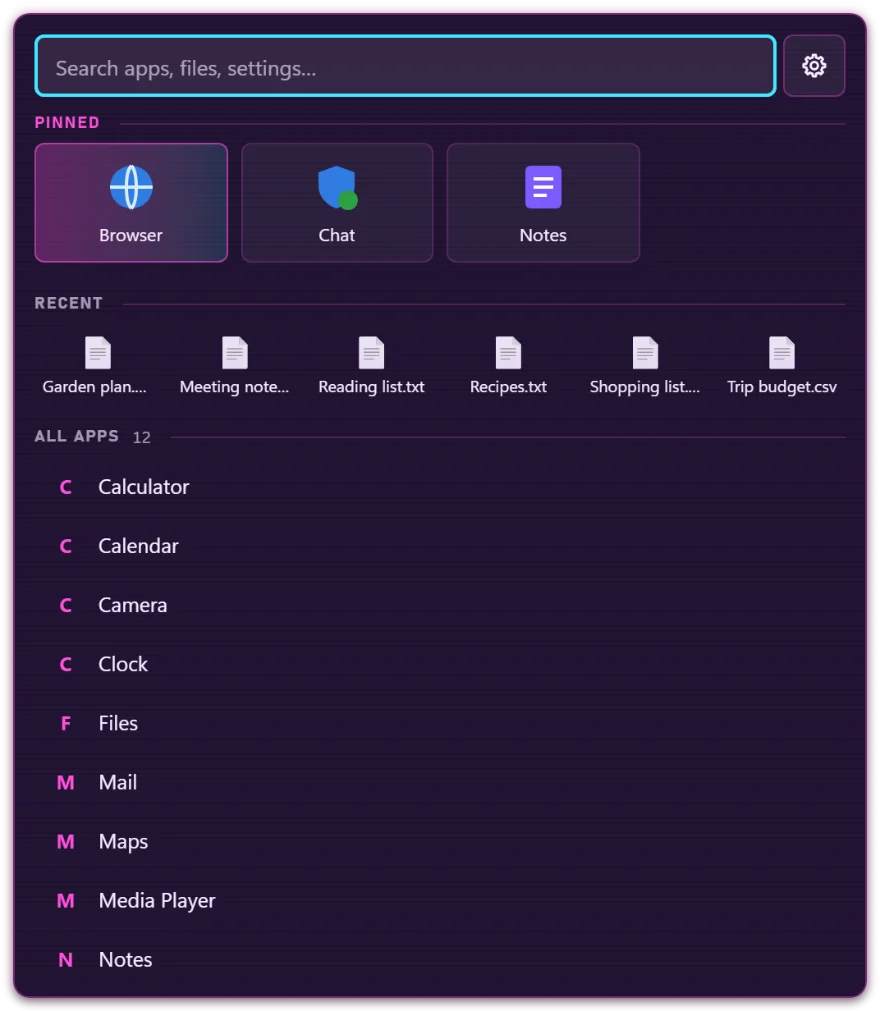
Pick a layout
To change how the launcher opens: Settings → Modules → Launcher → Look → Layout.
- Menu (default): pinned, recent and all apps, by the button.
- Full-screen grid: every app in a big grid beside the bar, with folders made from the app's install folder or maker, and Pinned, Recent and All apps tabs.
- Search box: a centred box that suggests your most used items, pins and recent files, with results as you type.
Pop-up size on the same tab sets the menu's size: S, M (default), L or XL. The grid always fills the room beside the bar.
Keys in the grid: arrows move, Home and End jump, Enter opens an app or a folder, Esc or Backspace leaves a folder, Tab and Shift+Tab switch tabs, and typing searches. In the search box: arrows move, Enter opens. In the grid and the search box, a click on empty space closes the launcher.
Search
Open the launcher and type. One search finds apps, pinned apps, recent files, files and folders, Settings pages, Control Panel items and your command buttons, and forgives typos.
- Enter opens the result, Ctrl+Enter runs it as administrator, and Shift+Enter opens its file location.
- Start with
apps:,files:orsettings:to search one kind only. - Files come from Desktop, Documents and Downloads, 4 folder levels deep, at most 5,000 entries. There is no full-disk index.
- Results you open often move up, but never above a clearly better match.
Do a quick sum
Type a sum such as 2*(3+4). The answer is the first result; Enter copies
it. You can use x, ×, ÷, ^, %, brackets, sqrt(), sin(), log(),
pi and a leading =. There are no units, currencies or variables.
Run a command
Start the line with >, like the system Run dialog: >ping localhost, then
Enter. Ctrl+Enter runs it as administrator after one system prompt. Quote
a path that has spaces. If something fails, the launcher stays open and says
why.
Search the web by keyword
Type a keyword, a space and your text: w tides searches Wikipedia. Nothing
is sent until you press Enter. Searches marked as fallbacks also show under
the results for any text you type.
Fourteen searches ship with Katofli. On by default: web (DuckDuckGo), w
(Wikipedia), yt (YouTube), map (OpenStreetMap), def (Wiktionary), tr
(DeepL), r (Reddit), imdb (IMDb) and gh (GitHub). Off by default: so
(Stack Overflow), mdn (MDN), npm, crates (crates.io) and pypi (PyPI).
To add, change or remove searches: Settings → Modules → Launcher → Searches.
- Add from template offers work tools (issue trackers, wikis, code hosts, chat) and Obsidian. Fill in your site or project and watch the preview.
- A link template uses
{query}for the typed text, or{1}to{9}for separate words (jp ABC 123can open…/browse/ABC-123). - Open in picks the browser a search opens in, and Profile one of its profiles.
- Restore default searches adds back shipped searches you removed. It never touches your own.
Limits: links must start with http://, https:// or obsidian://. A
keyword is at most 16 characters and cannot be apps, files or settings,
start with >, or hold a colon or a space. At most 64 searches.
Choose what the button opens
To make the launcher button open something else: Settings → Modules → Launcher → Button → Button opens:
- The launcher (default): Katofli's launcher.
- The system Start menu.
- A program: fill in Program (a full path or a program name on the system path) and Arguments.
- Another launcher: pick one under Launcher. Katofli shows whether each is detected on this PC.
Button mark on the same page changes the button's icon: The theme's own, Four tiles, Nine dots or Magnifier.
Right-click on the button always opens the quick link menu, whatever the button opens.
Open the launcher from the keyboard
- Settings → Shortcuts → Add shortcut → Open launcher. It has no default key. Pressing it again closes the launcher.
- Or let the system key open it: Settings → Shortcuts → System key → System key on its own opens the Katofli launcher. This works only while Katofli replaces the taskbar; Ctrl+Esc still opens Start.
Both work only while the main bar shows the launcher button.
See Keyboard for all shortcuts.
Every control on the matching Settings pages: Launcher.