 Katofli
Features
The ten things that matter most to someone choosing a taskbar replacement, then a plain checklist of what Katofli does and does not do.
Feature 1 of 10
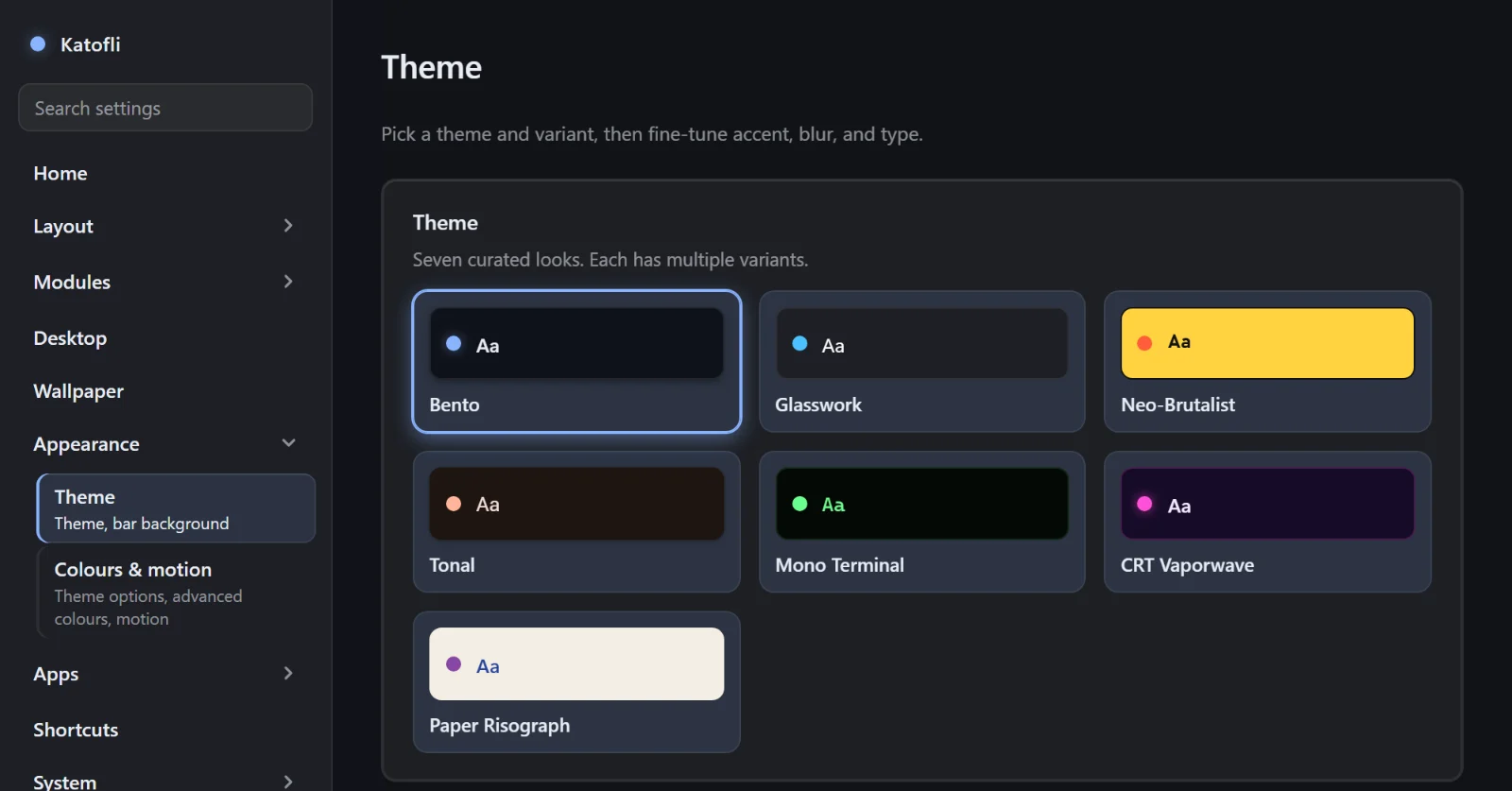
Themes that restyle the whole bar
Seven themes change shapes, type and motion as well as colours, across the bar, pop-ups, flyouts and Settings, each with several variants and a High Contrast one.
Feature 4 of 10
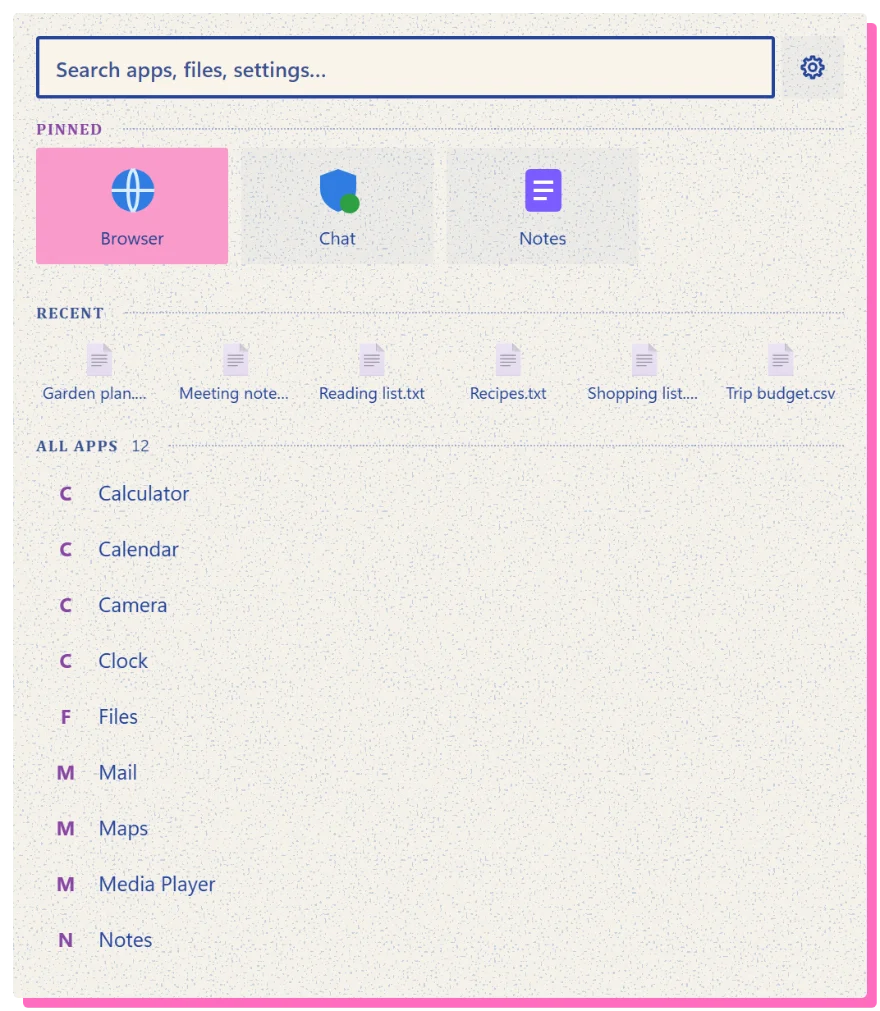
A launcher in three layouts
A menu, a full-screen grid or a search box that finds apps, files and settings even when you mistype, with sums, a run box and your own web searches.
Feature 5 of 10
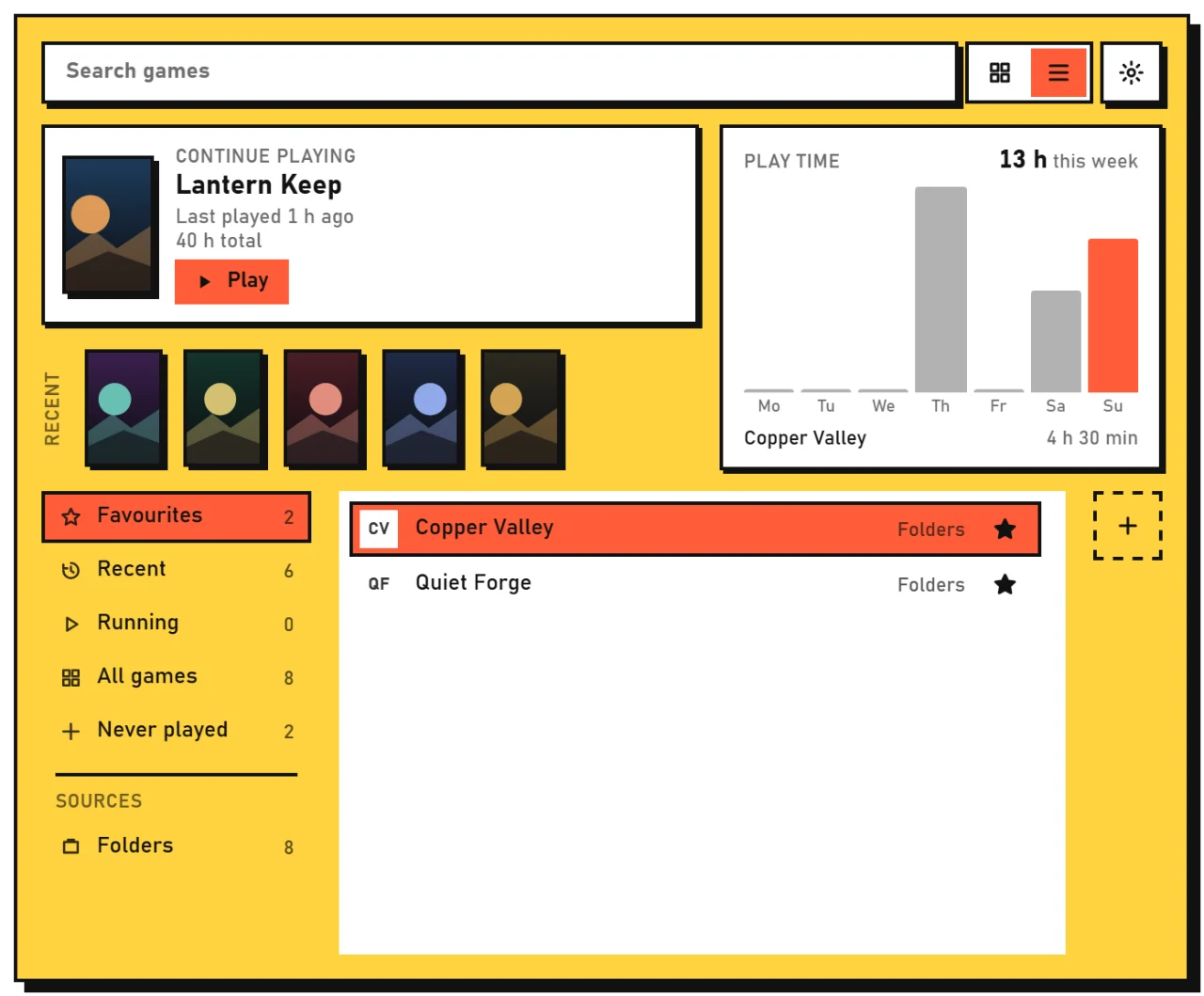
A game bar
One library from the game stores on your PC and your own folders, play time counted on this PC, companion tools that start with a game, and four layouts.
The other seven
2Several bars, and a layout per display
Up to four extra bars on any edge of any display, each with its own modules, height, visibility and colours; each display can change or hide the main bar.
3Layouts you switch in one step
Four presets and up to 12 saved layouts, with a way back to the one you left.
6Desktop widgets (experimental)
The weather, meters, what is playing and the game bar home as cards on the wallpaper, in your theme.
7Per-app rules
Hide, rename, re-icon or regroup an app on the task strip, and open it on a chosen display or desktop.
8Keyboard control
Global shortcuts, a keyboard mode for the whole bar, the system key on your tiles, and an opt-in themed Alt+Tab.
9Recovery that always gives the system taskbar back
Exit, a crash or a hard kill: a watchdog, the next start or an emergency key puts it back, and a crash at start offers a safe start.
10Portable mode and 14 languages
Run from a folder or a USB stick with settings beside it, in any of 14 languages that switch without a restart.
What Katofli does and does not do
One row per capability. Where something is partial or missing, the note says so. The full feature list is in the guide.
| Area | Capability | Katofli v1 |
|---|---|---|
| Bar & task strip | Bar on any screen edge, including left and right | yes: top, bottom, left or right, per display |
| Bar & task strip | Maximized windows stop beside the bar | yes: a visible bar reserves its strip on every edge |
| Bar & task strip | Auto-hide with adjustable timing | yes: show and hide delays, reveal distance, reveal when an app asks for attention |
| Bar & task strip | Task strip with pins, grouping, labels and hover previews | yes: also per bar (running only, pinned only, or both) |
| Bar & task strip | Download progress, badges and thumbnail buttons on task tiles | no: a third-party bar does not receive them; they stay with the hidden system taskbar |
| Bar & task strip | Per-app rules (hide, rename, icon, grouping, start position) | yes |
| Bar & task strip | Status icons with your own order and hidden set | yes: off until switched on in Settings |
| Launcher | Built-in launcher | yes: menu, full-screen grid or search box |
| Launcher | Typo-tolerant search over apps and settings | yes: apps, Settings pages, Control Panel items, command buttons |
| Launcher | File search | partial: Desktop, Documents and Downloads plus recent files; no full-disk index |
| Launcher | Calculator, run box and custom web searches | yes: the button can also open the system Start menu or another launcher |
| Game bar | Game library across stores and your own folders | yes: six launcher sources plus folders and programs you add; companion tools start with a game |
| Game bar | Play time | partial: counted on this PC from this version on; store play time is not imported |
| Game bar | Gamepad navigation | no: keyboard only |
| Modules & widgets | Built-in modules (media, weather, meters, Wi-Fi, Bluetooth, clipboard and more) | yes: more than 20, most off until added from the gallery |
| Modules & widgets | Several copies of one module on a bar | yes: up to 16 per bar, each with its own settings |
| Modules & widgets | Third-party modules | partial: experimental plugins draw a chip only, with no pop-up or click actions |
| Modules & widgets | Desktop widgets | partial: experimental and off by default; four widgets, display-only |
| Modules & widgets | Weather alerts and air quality | no |
| Modules & widgets | Virtual desktop switching from the bar | partial: viewing always; switching, adding and removing need the experimental private desktop API |
| Popovers | Themed volume and brightness flyouts | yes: hiding the system's own pop-up is experimental |
| Popovers | Wi-Fi, VPN and hotspot from the bar | yes: VPN connect for the system's built-in profiles only |
| Themes & customisation | Themes that change shapes and motion, not only colours | yes: seven themes |
| Themes & customisation | Follows system light/dark and high contrast | yes |
| Themes & customisation | Transparent or translucent bar | yes: with readable text over the wallpaper |
| Themes & customisation | Blur of the desktop behind the bar | no: blur applies to the bar's own content only |
| Themes & customisation | A different theme per bar | partial: one theme for all bars; each bar can repaint its colours |
| Themes & customisation | Wallpaper changer | yes: still images only; no video or animated wallpapers |
| Settings | Every option in a Settings window, with search | yes: plus a plain text config that applies hand edits live |
| Settings | Languages | yes: 14, all machine-assisted; no right-to-left layout |
| Settings | First-run setup wizard | no |
| Settings | Import and export of layouts | no: saved layouts stay in the config |
| Keyboard & shortcuts | Global shortcuts and full keyboard control of the bar | yes |
| Keyboard & shortcuts | Themed Alt+Tab | yes: opt-in |
| Multi-monitor | Several bars and per-display layouts | yes: up to four extra bars |
| Multi-monitor | Window tiling | no: out of scope |
| Reliability & safety | System taskbar restored after a crash or hard kill | yes: separate watchdog, next start, emergency key, --restore-shell; a crash at start offers a safe start |
| Reliability & safety | Install without administrator rights | yes: per user only; no machine-wide install |
| Reliability & safety | Signed installer | no: the first public version is unsigned, so SmartScreen warns |
| Reliability & safety | Automatic update channel | yes: daily check from GitHub, signed installers, install on request |
| Performance | Lighter on battery and during full-screen apps | yes: three levels and a full-screen pause, opt-in |
| Privacy | Streaming mode that hides personal details | partial: manual switch; window titles and some names are not covered |
| Privacy | Nothing sent to the developer | yes: the About page lists what is sent and where |
| Portable mode | Run from a folder or USB stick | yes: the portable copy does not update itself |
Glossary
The terms you meet in Settings and in the guide, in alphabetical order.
- Accent: the highlight colour a theme uses for marks, fills and selection. It can come from the theme, the wallpaper or the system.
- Bar: a strip along one edge of a display that holds modules. The main bar is the one every display gets by default; an extra bar is one you add (up to four), with its own settings.
- Bar view: one of the looks a module offers on the bar (for example the clock's time only or analogue face), picked from live previews.
- Chip: a module's small control on the bar, such as the clock or the volume icon with its reading.
- Community palette: a well-known colour scheme (Nord, Catppuccin, Rosé Pine) offered as a variant of some themes.
- Companion tool: a program you use beside games, kept in the game bar's utilities strip and started by a launch profile.
- Config file:
config.toml, the plain text file that holds every setting. Settings edits it in place and keeps your comments; hand edits apply live. - Desktop widget (card): a module shown as a card on the wallpaper, under the desktop icons. Cards are display-only; their controls stay in the bar's pop-ups. Experimental and off by default.
- Desktop layer: the transparent window per display that holds the desktop widget cards.
- Edit mode: the state in which you drag a bar's modules between zones (right-click the bar, Edit bar), or move and resize desktop cards (Edit desktop widgets).
- Emergency keys: two key combos that work even while the UI hangs: Ctrl+Alt+Win+R reloads Katofli's windows, Ctrl+Alt+Win+K quits and brings back the system taskbar.
- Flyout: a small card that appears for a moment when the volume, brightness, track or desktop changes, then goes. It never takes focus.
- Game bar: the module that gathers your games from the launchers on this PC and your own folders, starts them, and counts play time.
- Gallery: the Settings tab that lists every built-in module with an Add button.
- High Contrast: the variant every theme has for the strictest contrast; it shows by itself while the system's high-contrast mode is on.
- Keyboard mode: the short state in which the bar has the keyboard (Ctrl+Alt+B by default); focus goes back to your app when you leave.
- Knob: the config name for a theme option, the settings each theme has of its own (
[theme.knobs.<theme>]), such as spacing or scanlines. - Launch profile: a game's list of companion tools to start with it, and whether to close them when the game exits.
- Launcher: Katofli's app and search panel, opened from the launcher button as a menu, a full-screen grid or a search box.
- Layout preset: a ready-made arrangement of bars and modules, such as "Status bar + dock", applied in one step.
- Library: the game bar's list of every game it found; also the name of its full-screen layout.
- Log:
katofli.login the logs folder, what the current run logged (earlier output, usually the runs before, askatofli.1.logtokatofli.3.log), with paths inside the user folder shown as%USERPROFILE%(other details can remain, so look through it before sharing);watchdog.logsays how each run ended. A debug build also prints the lines to its console.perf.logis there only while the performance log is on. - Module: one thing the bar can show, such as the clock, the task strip, the launcher button or the weather. A module copy (instance) is a second or later copy of a module on the same bar with its own settings.
- Peek: a menu item that shows the hidden system taskbar beside Katofli until you click it again.
- Performance mode: the level (Full, Reduced or Minimal) Katofli runs at when plugged in, on battery or in Energy Saver.
- Pin: an app kept on the task strip whether it runs or not.
- Plugin: an experimental small script, with a manifest, that draws its own chip on the bar.
- Pop-up (popover): the panel a module opens when you click its chip, such as the calendar or the volume mixer. Most come in four sizes.
- Portable mode: Katofli run from the portable zip, with a
portable.flagfile next tokatofli.exe; settings, caches and logs live in adatafolder beside it. - Private desktop API: undocumented system interfaces Katofli can use, when you turn them on, to switch, add and remove virtual desktops. Experimental.
- Quick links: the menu of system tools on a right-click of the launcher button.
- Quick settings: the pop-up with Wi-Fi, Bluetooth, volume, brightness, power mode and a grid of switches.
- Replace-shell: the mode (
[general] replace-shell, on by default) in which Katofli hides the system taskbar and takes its place. Off, Katofli runs beside it. - Reserve space: a bar keeping its strip of the screen so maximized windows and desktop icons stop beside it.
- Safe start: a start that leaves out the parts running other programs' code inside Katofli (system app icons, other apps' status icons, plugins, desktop widgets). Offered after a crash at start, or with
katofli.exe --safe-start; after two start crashes in a row the start is a safe start automatically. - Saved layout: an arrangement of bars and modules you stored under a name (up to 12), to switch back to later.
- Status icons: the small icons other apps put on the taskbar (the tray), shown on the bar or behind the chevron.
- Streaming mode: one switch that covers personal details on the bars and pop-ups while you stream or share the screen.
- System key: the key with the system logo. With the taskbar replaced it can open Katofli's launcher and, with its number combos, Katofli's tiles.
- Task strip: the module that shows pinned and running apps as tiles.
- Task switcher: Katofli's opt-in, themed Alt+Tab.
- Theme: a complete look for the bar, pop-ups, flyouts, Settings and desktop cards: shapes, type, motion and colours. There are seven.
- Theme option: a setting a single theme offers, such as Neo-Brutalist's shadow depth; see Knob.
- Tile: one app's button on the task strip. A group tile holds several windows of one app.
- Tooltip: the small themed card a chip shows on hover or keyboard focus.
- Variant: one colour version of a theme, such as Bento's cool or warm, or a community palette.
- Watchdog: a separate helper process that waits for Katofli to end and puts the system taskbar back if Katofli crashed or was killed; it also shows the start-crash message.
- Work area: the part of a display left for windows once the bars have reserved their strips.
- Zone: one of a bar's three groups of modules: start, middle (centre) and end. In the config they are
left,centerandright.